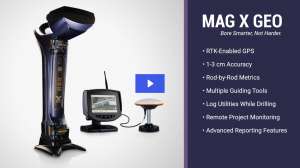

For utility contractors, knowing the right location to dig is vital. Thrust boring guidance systems play an integral role in helping contractors do just that.
The equipment, however, needs to be well-maintained to work properly so contractors receive an accurate picture of what’s located underground, says Brian Kelly, president of Pow-r Mole Trenchless Solutions.
“It is like any other piece of equipment. If it is not in good condition, it will take longer to finish what you need to do,” he says.
Examining the measurement tool to make sure it is accurate is the most important maintenance equipment check and should be completed daily or before each use. “A thrust boring guidance system measures distance, so you need to make sure what it is telling you is right,” Kelly says. “When you’re digging and you need to be at a certain depth — let’s say 6 feet — you want to make sure that when the sensor says 6 feet, it’s really 6 feet.”
Double-checking the distance is fairly easy: If it says something is 2 feet, pull out a tape measure and make sure it’s accurate. “You want to make sure the calibration is right; otherwise, it is garbage in, garbage out,” Kelly says.
Here are a few other maintenance tips to help contractors keep their thrust boring guidance systems in tiptop shape:
Keep it clean
Whether it is the steering heads, the transmitter, or the display monitor, the equipment should be cleaned after each use. Clean the screens on the receiver and remote display with a damp, soft cloth without cleaning agents, says Adam Hageman, sales manager with Universal HDD. As for cleaning the receiver, remote, and battery charger case, add a mild detergent to the soft, moist cloth.
Besides looking in obvious areas for dust and debris, Kelly advises contractors to check other places too, such as the springs in the battery component, since a poor connection can slow down the equipment.
Check for software updates
Locators have pre-loaded software, and manufacturers make occasional changes to it, so check with the tool manufacturer from time to time to make sure nothing has changed. If it has, update the software on your tool since this will lead to better performance.
Check the batteries
There are two types of batteries used in the guidance systems. One is rechargeable battery pack to power the receiver and remote display. Keep those batteries well-charged, and pay attention to how long the charge lasts. For example, if a battery previously held a charge for 50 hours but now only lasts a day, it is a good idea to contact the manufacturer about a replacement.
The second type of batteries are located in the transmitters and are purchased at any retail store. “Make sure you buy high-quality ones since they last longer and you won’t have to worry about replacements as much,” Kelly says.
Keep an eye on the temperature
Transmitters are usually equipped with an internal digital thermometer. The receiver normally has an icon showing a reading. Hageman says it is vital to watch that, and if the transmitter gets above 95 degrees F, take a break. The risk of damage to the transmitter increases dramatically above that temperature.
Handle equipment with care
This may seem like a no-brainer, but improper storage or handling of the rod string could affect how well the digital transmitter located in the housing at the front of equipment works, Hageman says. If that information is inaccurate, the project’s success is in jeopardy. When done using the equipment, put everything away in cases and keep away from moisture and extreme heat or cold.
LEAVE IT TO THE MANUFACTURER
While contractors can test or fix several components on their equipment, Kelly says there is one part they should leave to the manufacturers to handle: the locator.
“If you try to repair the locator yourself, the ramifications could be devastating,” he says. “If you find the locator is not working properly, just go ahead and send it in. That’s something you do not want to deal with.”
Continue reading for free